

Your Forms Should Talk to Your CRM
When someone submits a form on your WordPress website, their information can automatically be sent to Bigin and organized into the right contacts, companies, and pipelines.
Gravity Forms
is great at collecting leads on your WordPress website.
Bigin
is great at managing pipelines, contacts, and customer deals.
Our Plugin
connects the two automatically in real-time.
Website Submission → Direct Field Routing Engine → Contacts · Companies · Pipelines & Stages
“Your team can spend less time entering data and more time following up.”
Gravity Forms for Bigin CRM
Send Gravity Forms Leads Straight to Bigin CRM
Connect Gravity Forms with Bigin CRM and automatically turn WordPress form submissions into organized CRM contacts, companies, and pipeline records.
- No copying and pasting
- No missed leads
- No complicated middleware
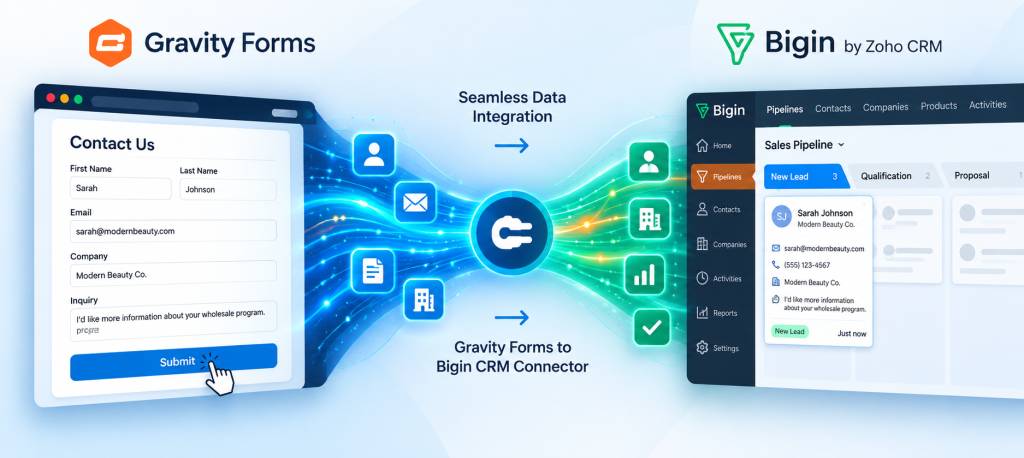
Connect WordPress to Bigin in Minutes
No complex webhooks or confusing third-party scripts. Get up and running in 4 quick steps.
Connect Bigin
Securely connect your Bigin CRM account to WordPress using official OAuth authorization.
Official Zoho OAuth
Choose a Form
Select any existing Gravity Form you want to connect—from contact forms to complex quote requests.
Any Gravity Form
Map Your Fields
Choose where each Gravity Forms field should go in Bigin with an intuitive point-and-click dropdown interface.
Custom Fields Supported
Start Collecting
Sit back as new submissions automatically flow straight into your CRM in real-time without delays.
100% Automated
More Than Contact Sync
Don’t just dump form submissions into a contact database. Gravity Forms for Bigin CRM turns website inquiries into structured CRM records your team can actually work with.
Contacts
Automatically create or update Bigin contacts from Gravity Forms submissions.
Mappable Attributes:
- First and last name
- Email address
- Phone number
- Website & socials
- Lead source
- All custom contact fields
Synchronized instantly upon form submit.
Companies
Create and update company records for B2B leads and business customers.
Mappable Attributes:
- Company name
- Corporate website
- Headquarter phone
- Location & address
- Business / industry type
- Custom company information
Links newly created contact to company record.
Pipelines
Turn submissions into actionable pipeline records with stage assignment.
Key Capabilities:
- Route directly to specific pipeline
- Target precise pipeline stage
- Attach deal value & timelines
- Set deal ownership automatically
- Triggers Bigin CRM sales workflows
- Alerts team on high-priority leads
Your team knows instantly what needs attention.
Prevent Duplicate Contacts
People submit forms more than once. Your CRM shouldn’t create a new contact every time. Gravity Forms for Bigin CRM identifies existing contacts using their email address and updates the existing Bigin record instead of creating unnecessary duplicates.
- Keep your CRM cleaner automatically.
- Maintain history while keeping notes, stages, and contact info up to date.
Contact Resolution Logic Tree
Form Submitted
↓
Check Email in Bigin CRM
↓
Does Contact Exist?
YES → Update Contact
Appends details & refreshes record
NO → Create Contact
Instantiates clean new CRM lead
Map Gravity Forms Fields to Bigin
You decide where your information goes. Map Gravity Forms fields directly to available Bigin fields.
| Gravity Forms Input | Sync Flow | Bigin CRM Destination Field |
|---|---|---|
| First Name | → | First Name |
| Last Name | → | Last Name |
| → | Email (Primary) | |
| Phone | → | Phone |
| Company | → | Company Name |
| Website | → | Website |
| Lead Type | → | Contact Type (Picklist) |
| Message / Notes | → | Description |
Use standard Bigin fields or map submissions into your custom CRM fields. Your forms don’t need to change just because you’re connecting a CRM.
Send Leads to the Right Pipeline
Not every form submission belongs in the same place. Create Bigin feeds for individual Gravity Forms and control exactly what happens when each form is submitted.
Sales Inquiries
Request a Quote
Routes dynamically to:
Pipeline: Sales Pipeline
Stage: New Lead
B2B Trade
Wholesale Application
Routes dynamically to:
Pipeline: B2B Partnerships
Stage: New Application
Distribution
Dealer Application
Routes dynamically to:
Pipeline: Dealer Pipeline
Stage: Application Received
Marketing
Influencer / Creator
Routes dynamically to:
Pipeline: Partnerships
Stage: New Influencer
“Your CRM starts organized instead of requiring someone to organize it later.”
Built for High-Impact Use Cases
Explore how modern businesses manage lead intake, partnerships, and high-volume operations.
01. Inbound Leads
B2B Lead Generation
Ideal for agencies, manufacturers, professional services, distributors, and B2B software companies. Automatically generate both Contact and Company records simultaneously.
Target: Agencies, Consultancies, SaaS & Manufacturing
02. Commerce & Resale
Wholesale Applications
Capture corporate resale certificates, tax numbers, and storefront locations. Map them into stages: New Application → Review → Qualified → Approved → Active.
Target: Brands & Physical Wholesale Suppliers
03. Creator Marketing
Influencer & Affiliate Intake
Collect social handles, verified audience metrics, content niche, and desired collaboration tiers. Direct creators into dedicated brand sponsorship pipelines.
Target: D2C Brands & Talent Agencies
04. Local & Consultative
Service Leads & Estimates
Route consultation requests, pricing estimates, and on-site appointment requests directly to your sales reps with automatic pipeline stage placement.
Target: Contractors, Clinics & Home Services
05. Channel Sales
Dealer & Distributor Onboarding
Collect business credentials, inventory requirements, and geographic territories with full structured field synchronization into your distributor pipeline.
Target: Equipment Makers & Automotive Brands
06. Everyday Contact
Contact & Inquiry Forms
Keep customer contact information refreshed. If an existing customer fills out a contact form, their record updates smoothly without overwriting your original WordPress entries.
Target: Any WordPress Website with Gravity Forms
Use Gravity Forms Conditional Logic
Control when information gets sent to Bigin. Leverage native conditional logic to fire feeds based on specific user answers.
Example scenario: “What are you interested in?”
Wholesale → B2B Pipeline
Influencer → Partnership Pipeline
Retail Lead → Distributor Pipeline
One single Gravity Form can power multiple CRM workflows.
Keep Gravity Forms as Your Source of Truth
Every website submission is safely preserved in WordPress first. Even if Bigin CRM is undergoing maintenance or experiencing API throttling, your leads are never lost.
Know when your leads sync:
- Real-time sync status
- Contact, company & pipeline record IDs
- Last sync timestamp
- Exact API error logs
- Resync failed submissions, 1-click retry
Direct WordPress to Bigin Integration
Eliminate costly middleware, spreadsheets, and manual typing.
Your Website → Gravity Forms → Gravity Forms for Bigin CRM → Bigin CRM
No manual spreadsheets · No copy & pasting · No Zapier / Zoho Flow subscription
Why Connect Gravity Forms to Bigin?
Follow Up Faster
Leads enter your pipeline instantaneously so reps can engage prospects within minutes.
Reduce Data Entry
Eliminate hours of manual copying and pasting between emails, WP dashboards, and CRM screens.
Keep Your CRM Organized
Consistent records with standard formatting, custom picklists, and deduplicated email records.
Build Better Workflows
Automate your sales pipelines and trigger subsequent onboarding actions right inside Bigin.
Keep Your Existing Forms
No need to rebuild your frontend designs or embedded forms. Keep what is already working seamlessly.
Built for Custom Bigin
Sync custom contact fields, custom company fields, and personalized deal stages with zero friction.
MOST POPULAR
Single Site
Everything you need to connect one WordPress website to Bigin CRM.
$59
per year • 1 website
- ✓ Direct Gravity Forms → Bigin CRM integration
- ✓ Create and update Bigin contacts
- ✓ Create and update companies
- ✓ Send leads into Bigin pipelines
- ✓ Custom field and picklist mapping
- ✓ Duplicate contact detection
- ✓ Conditional Gravity Forms feeds
- ✓ Sync status, logging and resync tools
- ✓ Plugin updates and support
AGENCY LICENSE
Agency
Built for agencies managing Bigin integrations across multiple client websites.
$199
per year • unlimited websites
- ✓ Everything in Single Site
- ✓ Unlimited WordPress websites
- ✓ Use on client websites
- ✓ Contacts, companies and pipelines
- ✓ Custom field and picklist mapping
- ✓ Duplicate contact detection
- ✓ Conditional Gravity Forms feeds
- ✓ Sync status, logging and resync tools
- ✓ Plugin updates and support
Frequently Asked Questions
Everything you need to know about Gravity Forms for Bigin CRM.
Do I need an active Zapier or Zoho Flow subscription?
No. Gravity Forms for Bigin CRM is a direct WordPress-to-Bigin integration plugin. It connects directly with the Bigin API without requiring any monthly middleware subscription like Zapier or Zoho Flow.
Can I send different Gravity Forms to different pipelines?
Yes. With multi-feed routing and conditional logic, you can configure dedicated feeds for every form. Route contact submissions into one pipeline, wholesale requests into another, and partner applications into a third.
Does this support custom fields created in Bigin?
Yes. The plugin automatically fetches both standard fields and custom fields from your Bigin CRM account so you can map any Gravity Forms input to your tailored CRM schema.
What happens if my Bigin CRM connection has temporary downtime?
Gravity Forms stores every entry safely in your WordPress database first. The plugin logs the exact error details and allows you to retry or resync failed submissions with a single click.
How does duplicate contact checking work?
When enabled, the plugin inspects Bigin for a matching primary email address prior to record creation. If found, it safely updates the existing record with the incoming field values rather than creating clutter in your database.
Stop Copying Leads Into Your CRM
Turn your WordPress forms into the beginning of your sales and onboarding process. Connect Gravity Forms to Bigin CRM and automatically move new leads from your website into the contacts, companies, and pipelines where your team can take action.
Gravity Forms → Bigin CRM. Automatically.