NonStop Showcase

NonStop Showcase · WordPress Portfolio Plugin

Your work deserves a better showcase.

Create a WordPress portfolio that lets people explore your projects, see the details, and understand what you delivered. Choose your layout, add your project stories, and give website screenshots room to be seen.
Start with a free portfolio grid. Upgrade to Pro for browser-style website previews, additional layouts, search, filters, and more ways to make the presentation your own.
Built for agencies, freelancers, and creative businesses. No required page builder.
Browser Previews
Live Zoom 50% – 300%
3 Display Layouts
Clean, Browser, Editorial
Zero Page Builder
Pure Native Gutenberg
Portfolio Rethought

You built an entire website. Let people actually see it.

A great homepage can lose its impact when a portfolio squeezes the full screenshot into a narrow strip. Visitors see that you made something, but the design, details, and thinking behind it are hard to appreciate.
NonStop Showcase gives each project a clear introduction and room to explore. Use a focused cover image to get attention, then let visitors open a readable website preview or discover the full story on a case study page.

Make the details visible.

Let visitors scroll through a website capture at a useful size, keeping typography legible and layout flow intact.

Add the story.

Explain the challenge, your strategic approach, and what you delivered with structured, readable WordPress case studies.

Keep people exploring.

Help visitors find related work by service, industry, or category and glide between projects without page reloads.
Pro Feature

A better way to show the whole website.

Open your website projects inside a browser-style viewer that scrolls vertically. Visitors can explore the page, zoom in on the details, and move to the next project without closing the preview.

Desktop designs, with room to explore

Display your full-page desktop capture inside a scrollable browser frame. Zoom controls let visitors take a closer look, with settings from 50% to 300%.

Mobile work gets its own view

Upload a separate mobile capture to show the actual mobile design in a phone frame. Give visitors a clear way to switch between desktop and mobile work.

Highlight the details that matter

Add a captioned gallery for important pages, navigation, product details, checkout flows, or other parts of the project you want people to notice.

Keep the project story close

Show the summary, services, technologies, and project highlights beside the preview. Include links to the full case study and the live website when available.
terracotta-residence.design
Desktop
Mobile
100%
Architecture & Living

Terracotta House

WooCommerce
Custom Gutenberg
The Scope
Bespoke Architectural eCommerce & Editorial Journey
The Result
+142% time on site and international design award
Prev
1 / 8
Next
Flexible Presentation

Choose the presentation that fits the project.

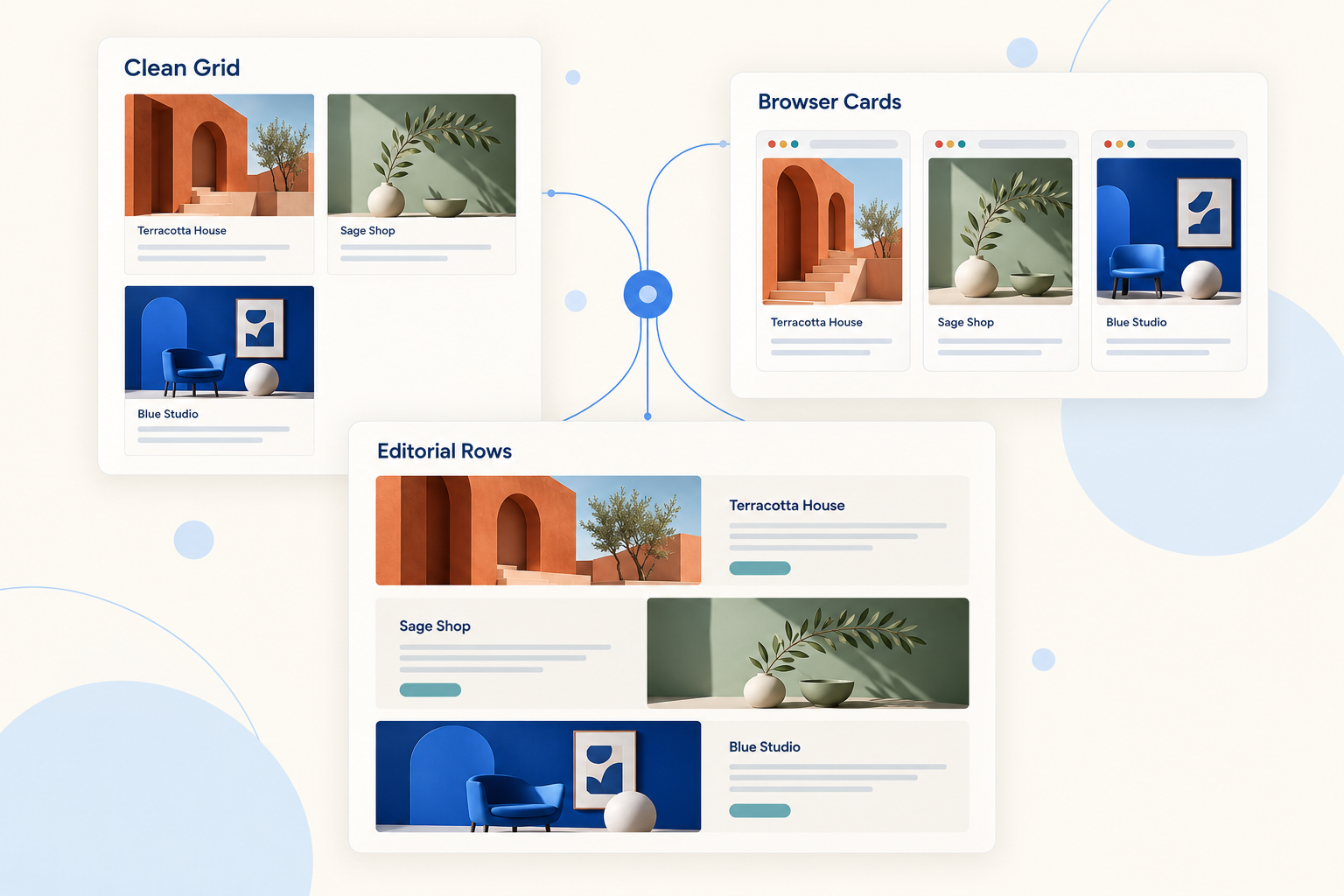
Build a clean project grid, a collection of website previews, or a portfolio with more room for the story. Reuse the same projects across different collections without entering everything again.
Included in Free

Clean Grid

A clear, familiar layout with project images, titles, and short descriptions. Give visitors an easy way to browse your work and open each case study.
Great for:
A main portfolio page, freelance work, design projects, and mixed creative collections.
Included in Pro

Browser Cards

Frame your website projects in lightweight browser-style cards. Pair them with the website viewer to take visitors from a focused cover image into the full design.
Great for:
Web design agencies, WordPress developers, WooCommerce specialists, and Shopify designers.
Included in Pro

Editorial Rows

Give each project a larger image and more space for its description. Alternate image and text placement to create a portfolio visitors can read as they browse.
Great for:
Selected work, branding projects, agency case studies, and projects that need more explanation.

Show the thinking behind the finished work.

Every project gets its own WordPress case study page. Add a clear summary, describe the problem, explain your approach, and show what changed.
Case Study Starter Pattern:
1. Overview
2. Challenge
3. Approach
4. Solution
5. Results
6. Next step
Add services, technologies, project images, and outcomes you can substantiate. Give prospective clients a better understanding of how you work and what you could help them accomplish.
Real project URLs and readable page content give your work a foundation for search discovery and sharing.
Pro Feature

Help your next client find work like theirs.

An ecommerce prospect may want to see stores. A healthcare business may want to see work in its industry. Make the relevant projects easier to find with keyword search and filters for categories, services, and industries.
Filter by “WooCommerce”, “Brand Identity”…
All Projects
Ecommerce
Healthcare
WordPress
Shopify
Choose the controls each collection needs, from simple category buttons to a more detailed set of filters. Visitors can narrow the results, clear their selections, and continue browsing across pages.
Search covers project titles, summaries, and case study content.
Expanded Styling in Pro

Make your portfolio feel at home on your website.

Match your brand with light, dark, or theme-matching styles. Adjust spacing, corners, accent colors, and card presentation to create a collection that feels like part of your site.
Keep the look understated or add hover lift, image zoom, soft shadows, accent glows, and an Aurora background. Preview your collection at desktop, tablet, and phone widths as you work.
Use different collections for your homepage, service pages, and full portfolio.

Fast & Lean

Flexible layouts. Thoughtful loading.

A portfolio should help you show your work while respecting the rest of your website. NonStop Showcase loads the styles and scripts needed for the layouts and features on the page.
Image size, hosting, your theme, and other plugins still affect overall page speed.
Audience Fit

Built for businesses whose work speaks visually.

Web design and digital agencies

Show complete websites, mobile designs, and project stories. Organize work by service or industry so prospects can find relevant examples.

Freelance designers and developers

Present selected projects with clear descriptions and a consistent look. Start with a simple grid and expand your presentation as your body of work grows.

WordPress, WooCommerce, and Shopify specialists

Highlight the homepage, storefront, product pages, and user journeys you designed. Add the technologies and services behind each project.

Branding and creative studios

Combine project images, captions, and written context to explain the ideas behind the finished identity or campaign.

Photographers and visual creators

Use image-led collections and project galleries to organize selected work and give each project its own story.

In-house marketing teams

Build a searchable record of campaigns, website launches, and creative projects your team can share with stakeholders and partners.
Workflow

From finished project to published portfolio.

1

Add your work

Create a project with a title, cover image, and summary. Add your case study, website captures, and gallery images as needed.
2

Build a collection

Choose your layout and select the projects to include. Let a collection update automatically from your categories, or hand-pick projects and arrange their order.
3

Place it on your site

Add the Portfolio Collection block in WordPress or paste the collection shortcode into a compatible page builder or editor.
Plans & Packaging

Start free. Give your work more room with Pro.

NonStop Showcase Free

Starter
$0
forever free
Create a clean portfolio with individual project pages and a straightforward browsing experience.

NonStop Showcase Pro

Most Popular
$39
/ year (suggested)
Give visitors a richer way to explore your work with website previews, more layouts, and advanced collection controls.
Everything in Free, plus:

Compare the plans

15 Features Detailed
Feature
Free
Pro
Clean Grid layout
Included
Included
Individual case study pages
Included
Included
Automatic and hand-picked collections
Included
Included
Gutenberg block and shortcode
Included
Included
Standard pagination
Included
Included
Browser Cards layout
—
Included
Editorial Rows layout
—
Included
Scrollable website viewer and zoom
—
Included
Desktop and mobile preview tabs
—
Included
Popup detail gallery
—
Included
Viewer next/previous navigation
—
Included
Visitor search and taxonomy filters
—
Included
Instant filtering and pagination updates
—
Included
Expanded styling, glows, and effects
—
Included
Collection preview with device widths
—
Included
Integration & Tech

Add it to the WordPress workflow you already use.

Use the Portfolio Collection block in the block editor, or add a shortcode through Elementor, Divi, widgets, and the classic editor.
Project pages use your theme’s surrounding design, including its header, footer, and typography. Developers can also customize supported template fragments through their theme.
Technical Requirements
WordPress
6.4+ (6.7+ for FSE template)
PHP
7.4 or newer
Page Builders
Gutenberg, Divi, Elementor
Got Questions?

Frequently asked questions

Do I need a page builder?

No. Use the Portfolio Collection block in WordPress or place a shortcode in a compatible editor or page builder.

Can I show the full homepage without shrinking it into a strip?

Yes. Pro’s website viewer displays the capture in a scrollable browser frame, with zoom controls so visitors can explore the design.

Does it take website screenshots for me?

You upload your own screenshots. Automatic screenshot capture is not included in the current version.

Can I show mobile designs?

Yes. In Pro, upload a separate mobile screenshot to add a Mobile tab and phone-style view. The plugin uses your actual mobile capture.

Does every project get its own page?

Yes. Both editions include individual case study pages with project URLs and room for your written content.

Is it search-engine-friendly?

Projects have real links, server-rendered content, and individual case study pages. These provide a technical foundation for discovery. Search visibility also depends on your content and wider SEO work.

Can I use the same project in different portfolios?

Yes. Add a project once and include it in multiple collections. You can also reuse a collection on different pages.

Does it load every layout on every page?

No. Frontend assets load for the layouts and features used on the page. A page without a portfolio loads no plugin frontend assets.

Can I add filters for different types of work?

Yes. Pro includes visitor-facing category, service, and industry filters, plus keyword search.

Is this only for website portfolios?

No. The website viewer is especially useful for web agencies, while project grids, editorial layouts, galleries, and case studies can also present branding, photography, and other creative work.

Will it match my theme?

The plugin works within your theme, and Pro adds expanded visual controls. Custom themes and unusual templates may need small adjustments.
Elevate Your Portfolio Today

Give your next client a clearer picture of what you can do.

Show the design. Explain the thinking. Make your best work easier to explore.
Start with NonStop Showcase Free, or choose Pro for website previews, additional layouts, and more ways to help visitors find the projects that matter to them.