
- WordPress Menu Management Reimagined
Better WordPress menus.
Meet NonStop Nav Toolkit. Organize, edit, and manage your website’s navigation without endless scrolling or moving every item individually. Collapse branches, move links together, recover removed items, and import or export menus from one convenient workspace.
- Compatible with classic WP menus • Instant download • 14-day guarantee
Your menu editor should keep up with your website
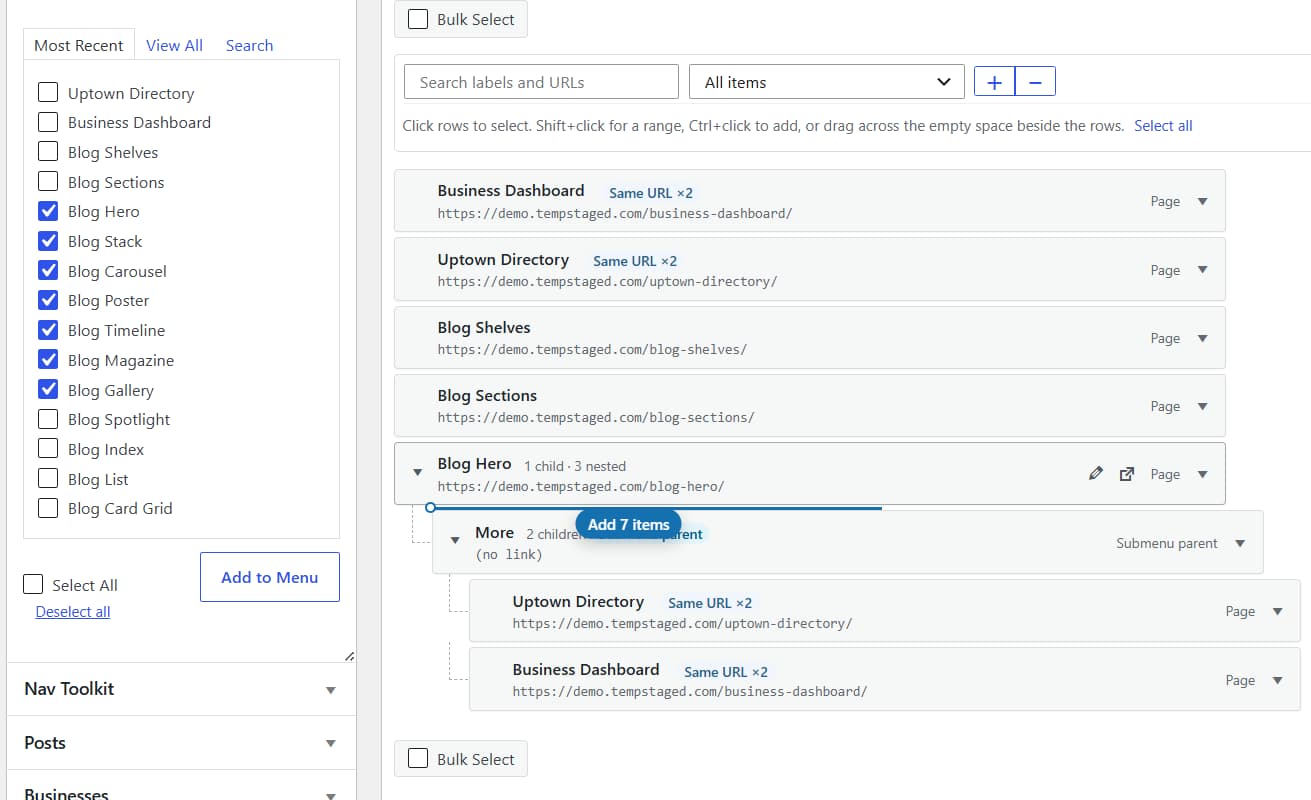
A simple menu is easy to manage. Add dropdowns, service pages, product categories, and custom links, and every change takes more work. NonStop Nav Toolkit improves the familiar Appearance > Menus editor so you can spend less time arranging navigation and more time building your website.
See the structure. Find the link. Make the change.
Collapse the clutter
Collapse entire branches to focus on the section you’re editing. Expand everything when you need the full picture.
Find items faster
Search existing menu items by label or URL, with their parent structure preserved for context.
Edit directly
Update labels and URLs inline without opening a settings panel for every single small modification.
Headings without hacks
Add a label-only item directly. Build submenu headings without adding # and having to delete it afterward.
Engineered for large menu hierarchies
Move a whole group in one action
Select multiple navigation items and rearrange them together. Move a group up or down, place it under another parent, or bring it back to the top level. Keep its order and nested relationships intact.
Prefer to skip dragging? Choose the destination parent using a simple control.
Remove links with a recovery option
Clean up your menu without immediately losing the items you remove.
- Select and remove multiple items together.
- Send removed links to menu-item trash.
- Restore individual items or complete branches.
- Undo changes before saving.
- Permanently delete items when you’re ready.
- Removing a navigation item leaves the linked page, post, or product untouched.
Portability & Visibility Power Tools
Take your menus with you
Export a menu to JSON and import it into another WordPress installation. Preview its structure before importing and review destinations that need attention.
Basic import creates a new menu, keeping your existing navigation intact. With Pro, import selected branches, merge into an existing menu, and replace domains or URL paths with a preview before applying changes.
Show the right links to the right visitors
Keep public navigation relevant to the person using it. The free version lets you show items to everyone, logged-in users, or logged-out visitors. Add a dynamic Login or Logout link without maintaining separate static destinations.
Pro adds role-based visibility and a preview of what different visitors will see. Menu visibility controls which links appear. Access to the destination is managed separately.
- More websites. Fewer repetitive edits.
NonStop Nav Toolkit Pro adds tools for bigger menus and repeated client work.
Duplicate instead of rebuilding
Copy a complete menu or duplicate a branch with its child items.
Make changes in bulk
Update supported fields across a selection. Replace domains and URL segments with a clear before-and-after preview.
Import with more control
Select the branches you need, merge menus, and review potential duplicates.
Control navigation by user role
Display relevant links for different WordPress roles and preview the results before saving.
Instant single-site license key & priority updates
Built for people who maintain WordPress websites
Website owners
Make everyday navigation updates with fewer steps and zero coding headaches.
Freelancers
Organize client menus and reuse entire navigation structures without rebuilding them from scratch.
Agencies
Reduce repetitive editing across high-volume service, content, and client ecommerce websites.
Store managers
Keep expanding WooCommerce product and category navigation effortless to maintain.
Choose your toolkit
Start free for everyday menu editing. Upgrade to Pro for duplication, bulk changes, advanced imports, and role-based navigation.
Frequently Asked Questions
Does this change my WordPress dashboard sidebar?
No. NonStop Nav Toolkit improves the website navigation builder under Appearance > Menus.
Will it redesign my website’s menu?
The core plugin focuses on menu structure, editing, and visibility. Your theme continues to control its front-end appearance. Label-only headings and submenu behavior depend on supported theme output.
Does it work with block-theme navigation?
The initial release supports classic WordPress menus. Native Navigation block editing is outside the initial release.
Does deleting a menu item delete its page?
No. Menu-item trash contains navigation links, not the content they point to.
Can I import a menu from another website?
Yes. Export and import the menu structure, then review destination links before applying it. Pro provides additional merging and URL replacement tools.
Does the free version include group movement and trash?
Yes. Multiple selection, group movement, nesting, bulk removal, and recoverable menu-item trash are included.
Build, organize, and manage navigation faster with NonStop Nav Toolkit.
Empower your classic WordPress menus with the visual structural workflow they deserve.