

Bring your Redbubble designs to your
Give your designs a storefront on your own website. Export your published Redbubble designs with a Chrome extension, import them into WooCommerce, and send shoppers to Redbubble when they’re ready to buy.
Requires desktop Chrome for exports and WordPress with WooCommerce for imports.
Give your artwork a shop that feels like yours
Your portfolio tells people who you are. Give those same visitors a place to browse what you sell. Put a themed collection beside a blog post, add merch to an existing WooCommerce catalog, or build a dedicated shop page for your artwork.
The Perfect Division of Labor
Your site handles discovery. Redbubble handles checkout, production, and shipping for purchases made on Redbubble.
Themed collection on a blog
Writing about your creative illustration process or travel sketches? Embed an inline grid of matching T-shirts and stickers right inside your editorial content.
Merch in existing shop
Already selling digital downloads, prints, or courses on WooCommerce? Seamlessly introduce on-demand apparel and prints without inventory risk or packing boxes.
Dedicated artist portfolio
Transform your portfolio from a static digital gallery into a dynamic, branded direct storefront where every piece has a clear and inviting path to buy.
From Redbubble to WooCommerce in three steps
A seamless export-import pipeline designed for artists and WordPress site owners.
1. Choose what to export in Chrome
Open your public Redbubble shop and scan it with NonStop Shop Export for Redbubble. Select individual designs or whole collections. Choose T-shirt links or each design’s default product, then download a JSON file.
2. Preview and import in WordPress
Upload the file under Products → Redbubble → Import. See which designs are new, changed, or up to date. Choose which listings to import and whether to use product mockups, artwork previews, or no images.
3. Display your designs and send shoppers to buy
Imported designs become WooCommerce External/Affiliate products. Display them in your shop or embed a selected collection on a page. The purchase button opens that design’s listing on Redbubble.
Two tools that work together
Everything you need to extract your catalog and display it seamlessly on WordPress.
NonStop Shop Export for Redbubble
- No Redbubble sign-in required: Scan published designs from your public artist shop using just your Redbubble username.
- Precision filtering: Find designs by title or tag, select a whole collection, or export a few favorites. Skip mature designs easily.
- Image & collection depth: Include collection data and optionally collect gallery images (model shots, artwork previews).
- Instant download: Download a clean, standardized JSON file ready for WooCommerce import.
NonStop Shop Links for Redbubble
- Organize as you import: Automatically convert Redbubble collections into WooCommerce categories and import descriptive tags.
- Keep your edits in WordPress: Smart design ID matching preserves your custom titles, galleries, and tags across re-imports.
- Shortcode builder: Easily embed curated collection grids anywhere on any WordPress post, page, or layout block.
- Style the shop to fit your site: Customize button labels, color palettes, image crops, and interactive hover effects.
- Controlled conversion routes: Control where the buy button sends shoppers using custom deep links or affiliate tracking tags.
Give each collection its own place to sell
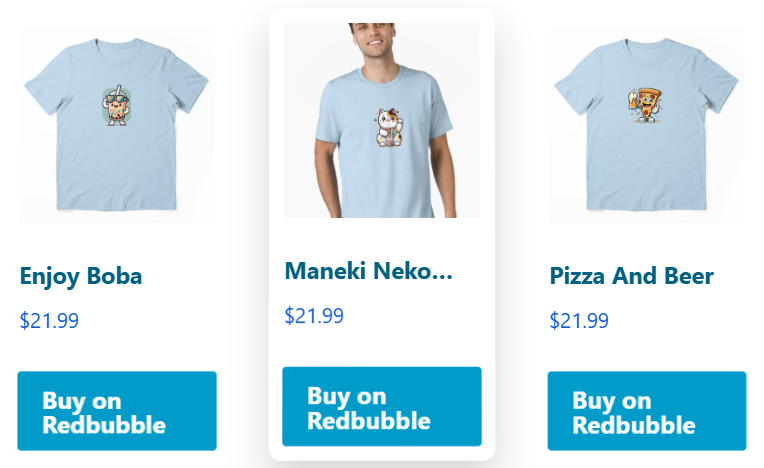
Run a design blog? Add a row of matching prints or shirts beneath a post. Build a portfolio? Give each series a collection page with a grid of related designs. Already sell through WooCommerce? Add your Redbubble designs as linked listings alongside the products you sell directly.
Shop the Dev Humor collection
Retro Sunset Peak Tee
Vintage sun sinking behind minimalist geometric mountain pines.
Cosmic Kitty Canvas
Playful stretching feline floating through deep ultraviolet nebula stars.
Rocket Fuel Sticker
Glossy vinyl retro rocket blasted with hyper-caffeinated booster particles.
Cyber Neon Hoodie
Heavyweight fleece featuring isometric grid lines and glowing city accents.
Start with a free export
Choose the workflow that fits your creator business. Straightforward, transparent pricing.
Catalog Export
Choose designs from your public Redbubble shop and download your catalog file.
- Export public Redbubble designs
- Filter by collection or keywords
- JSON catalog file download
- No account or login needed
1 Site License
Import and display your designs on one WordPress site. Includes plugin updates and support during your subscription.
- Single WordPress site activation
- Automated WooCommerce imports
- Shortcode generator for any post/page
- 1 full year of updates & direct support
5 Sites License
Use the same import and storefront features on up to five WordPress sites. Includes plugin updates and support during your subscription.
- Up to 5 WordPress sites
- Ideal for multi-portfolio artists or agencies
- Shortcode generator + custom buy links
- 1 full year of updates & priority support
The Chrome extension works with either plugin plan. Prices are in USD.
Frequently asked questions
Find answers to common questions about setup, checkout, and compatibility.
1. Do I need both tools?
Yes, they work together as a two-part system. The free Chrome extension is used on your desktop browser to scan your public Redbubble shop and export your designs to a clean JSON file. The WordPress plugin is installed on your site to import that file and generate native WooCommerce external product listings.
2. Where do customers check out?
All checkouts take place on Redbubble. When a customer clicks the “Buy on Redbubble” button in your shop or post, they are directed straight to that item on Redbubble. Redbubble handles payment processing, customer service, printing, and international order fulfillment.
3. Does this automatically sync my shop?
Syncing is done on-demand rather than via background API polling. When you release new designs or update collections on Redbubble, simply run an export in Chrome and upload the new JSON file to WordPress. The plugin compares design IDs to detect what is new, changed, or already up to date without duplicating records.
4. Can I choose which designs or images to import?
Yes! In Chrome, you can select only specific designs, entire collections, or skip mature content. During the WordPress import step, you have full preview control: select exactly which listings to import, and choose whether to import product mockups, artwork previews, or no images at all.
5. Can I show Redbubble prices on my website?
By default, prices are left blank because Redbubble frequently changes base currency rates, offers flash discounts, and adjusts retail prices per country. Leaving the price to Redbubble avoids confusing your shoppers with outdated currency conversions.
6. Will every sticker, shirt, and print become a separate WooCommerce product?
No, each design is imported once as a cohesive design entry (linking directly to its default product or primary T-shirt listing on Redbubble). Shoppers can then choose their preferred product format (stickers, mugs, hoodies, or prints) right on the Redbubble design page.
7. Is this an official Redbubble integration?
No, NonStop Shop Links is an independent developer tool built by NonStop Dev to help artists expand their sales presence on self-hosted WordPress sites.
Disclaimer: Redbubble is a trademark of its respective owner. NonStop Dev and this product are not affiliated with, sponsored by, or endorsed by Redbubble.

Put your next collection on your own website
Pick a few designs, import them into WooCommerce, and give visitors a place to browse your work and buy it on Redbubble.
Works with any standard WooCommerce-enabled WordPress theme. Zero coding required.